Last updated: October 2026
Introduction – Red Hat OpenShift Architecture
Modern applications rarely run on a single server. An enterprise application may consist of multiple services, databases, APIs, background workers, and supporting components that must communicate reliably. Managing all these components individually becomes increasingly difficult as an application grows.
Container technology helps package applications and their dependencies into portable units. However, containers alone do not provide everything needed to operate applications reliably across multiple machines. Organisations also need scheduling, automated recovery, access control, networking, storage management, monitoring, and a way to maintain the underlying platform.
This is where Kubernetes and Red Hat OpenShift become useful.
OpenShift provides an enterprise platform built around Kubernetes, with additional services and management capabilities designed to simplify the deployment and operation of containerised workloads.
In this guide, we will examine OpenShift architecture from the ground up. We will look at its main components, explain how the different parts communicate, and explore how they fit together in a production environment.
1. What Is Red Hat OpenShift?
Red Hat OpenShift is an enterprise application platform based on Kubernetes. It allows organisations to deploy, scale, manage, and maintain containerised applications across supported infrastructure environments.
OpenShift uses Kubernetes for core container orchestration. Red Hat adds platform capabilities for areas such as cluster installation, security, application exposure, operational management, and lifecycle automation.
For example, imagine an organisation running an online banking application. The application might have separate services for authentication, customer accounts, payments, and notifications.
Instead of manually starting containers on individual servers, an OpenShift cluster can schedule application workloads across available worker nodes. If a container fails, Kubernetes controllers can work to restore the required state. If additional application capacity is needed, administrators can increase the number of application replicas.
OpenShift also provides a consistent platform for managing these workloads.
OpenShift and Kubernetes: What is the difference?
Kubernetes is the container orchestration technology responsible for scheduling workloads and maintaining their desired state. OpenShift builds on Kubernetes and adds an integrated enterprise platform around it.
Some important OpenShift capabilities include:
- Cluster lifecycle management: Tools and Operators help install, configure, update, and maintain the platform.
- Security controls: Authentication, role-based access control, Security Context Constraints, and other controls help administrators enforce security requirements.
- Application networking: Services and Routes provide mechanisms for application communication and external access.
- Developer experience: The web console, command-line tools, build integrations, and application deployment workflows help development teams manage applications.
- Operational management: Monitoring, logging integrations, and platform Operators support day-to-day administration.
OpenShift is therefore more than a graphical interface placed on top of Kubernetes. It is an integrated platform with additional components and operational workflows.
2. Understanding OpenShift Cluster Architecture
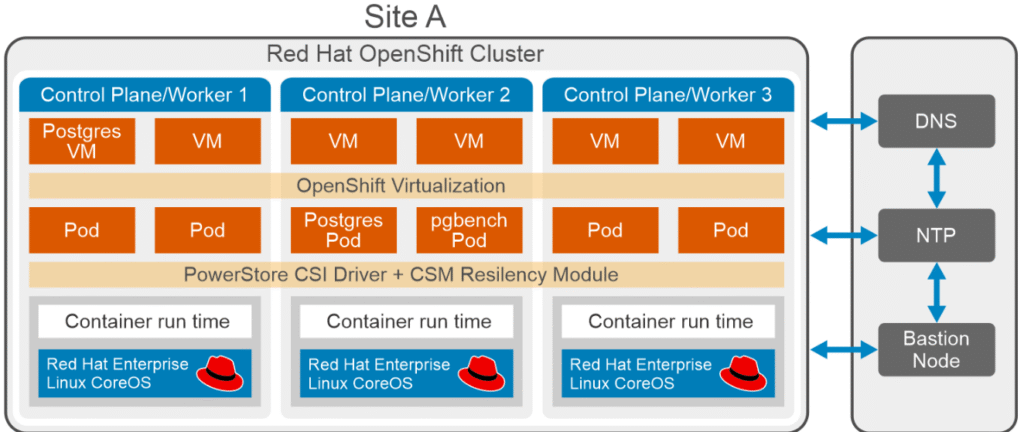
An OpenShift cluster is a collection of machines that work together to provide a platform for applications.
Although the physical infrastructure varies between environments, a typical cluster has two primary functional roles:
- Control plane nodes
- Worker nodes, also called compute nodes
Some deployments also use dedicated infrastructure nodes to isolate selected platform services from application workloads.
2.1 Control plane nodes
The control plane is responsible for managing the cluster. It maintains the desired configuration, coordinates workload scheduling, and exposes the APIs through which administrators and automation systems interact with the platform.
Consider a situation where an application should have three running replicas. The control plane processes the desired configuration and coordinates the scheduling and management of those replicas.
The actual application containers generally run on worker nodes rather than on the control plane in a conventional production design.
Important control plane components include:
- Kubernetes API server
- etcd
- Kubernetes scheduler
- Kubernetes controller manager
- OpenShift-specific API services and controllers
- Cluster Operators that manage platform functionality
Production deployments commonly use three control plane nodes to provide high availability. However, the correct topology depends on the OpenShift deployment model and its supported requirements.
2.2 Worker nodes
Worker nodes provide the computing resources used by application workloads.
These machines supply CPU, memory, networking, and access to storage for the Pods scheduled onto them.
A worker node runs essential services such as:
- The kubelet, which communicates with the control plane and manages Pods on the node.
- CRI-O, the container engine used by standard OpenShift Container Platform deployments.
- Supporting networking components that enable communication between Pods and services.
For example, a payment application may have several replicas distributed across multiple worker nodes. If a worker becomes unavailable, Kubernetes can attempt to recreate affected Pods on healthy nodes, provided sufficient capacity and other scheduling requirements are available.
This recovery is not instantaneous or guaranteed under every failure scenario. It depends on the health of the remaining infrastructure, application configuration, storage, and networking.
2.3 Infrastructure nodes
Infrastructure nodes are used to isolate selected platform services from ordinary application workloads.
Depending on the architecture and configuration, these nodes may host services such as monitoring components, logging infrastructure, or router workloads.
An important distinction is that a dedicated infrastructure node role is not mandatory in every OpenShift installation. Smaller clusters may run these services on other eligible nodes, while larger environments may separate them to improve resource isolation and operational management.
Example cluster layout
Consider the following simplified production design:
| Node group | Example quantity | Primary responsibility |
|---|---|---|
| Control plane | 3 | Cluster management and coordination |
| Worker nodes | 3 or more | Application workloads |
| Infrastructure nodes | Optional | Selected supporting platform services |
These quantities illustrate one possible layout, not a universal sizing recommendation. Actual production capacity depends on application demand, availability requirements, platform services, and the supported installation topology.
3. The Operating System Layer: RHCOS
The operating system is an important part of OpenShift architecture because it provides the foundation on which Kubernetes and container workloads operate.
Red Hat Enterprise Linux CoreOS (RHCOS) is the specialised operating system used by supported OpenShift Container Platform installations. It is designed to work closely with OpenShift’s automated configuration and update mechanisms.
RHCOS provides the host environment required by the platform, including the kernel and the services needed to run container workloads.
Several important components and concepts are associated with this layer.
3.1 Ignition
Ignition is used during the initial provisioning of RHCOS machines. It applies the configuration required to prepare a machine for its intended role.
Depending on the deployment, this configuration can include files, storage setup, users, and other initial machine settings.
A useful way to understand Ignition is to think of it as part of the process that prepares a machine before it becomes an operational member of the cluster.
3.2 Kubelet
The kubelet runs on each node and communicates with the Kubernetes control plane. It is responsible for making sure that the Pods assigned to that node are running according to their specifications.
For example, if a Pod is assigned to a worker node, the kubelet works with the container runtime to ensure that the containers in the Pod are started and managed appropriately.
The kubelet does not independently make all cluster-wide scheduling decisions. The scheduler selects suitable nodes, while the kubelet manages workloads locally.
3.3 CRI-O
CRI-O is the container engine commonly used by OpenShift Container Platform to run containers.
It implements the Container Runtime Interface (CRI), allowing Kubernetes to communicate with the container runtime.
When Kubernetes needs a container to be started, the node’s kubelet communicates with the runtime through this interface.
It is worth distinguishing CRI-O from the higher-level container orchestration functions performed by Kubernetes. CRI-O runs containers; Kubernetes coordinates workloads across the cluster.
3.4 Is RHCOS mandatory?
For supported OpenShift Container Platform 4.x installations, RHCOS is the standard operating system for control plane machines. Supported worker-node operating system options depend on the OpenShift release, architecture, and deployment configuration.
Do not assume that any general-purpose Linux distribution can simply be installed on a machine and joined to an OpenShift cluster. Always verify the operating system requirements for the particular release and installation method.
4. The Kubernetes Layer
Kubernetes provides the core orchestration capabilities on which OpenShift relies.
To understand OpenShift architecture, it is important to understand how the Kubernetes API server, etcd, scheduler, and controller manager work together.
4.1 Kubernetes API server
The API server is the primary entry point for Kubernetes API operations.
Administrators use tools such as oc and kubectl to submit requests. Automation systems, platform components, and applications with appropriate permissions can also interact with the API.
For example, an administrator might create a Deployment specifying that an application should run with three replicas.
The API server validates and processes the request, applies the relevant admission controls, and persists accepted state changes.
The API server is not responsible for directly starting every container. Instead, it coordinates access to the cluster’s API and state.
4.2 etcd
etcd is the distributed key-value store used by Kubernetes to persist its cluster state.
It stores information about Kubernetes objects, including their configuration and current recorded state. It is therefore a critical dependency for cluster management.
For example, a Deployment’s desired replica count and the configuration of its associated objects are represented in the cluster’s stored state.
etcd should not be thought of simply as a log of YAML files. YAML is a common format for expressing Kubernetes configuration, but etcd stores the underlying data used by the Kubernetes API.
Because losing access to etcd can severely affect cluster management, production environments require appropriate high-availability design, backups, monitoring, and recovery procedures.
4.3 Kubernetes scheduler
The scheduler determines which eligible node should run a newly scheduled Pod.
It considers factors such as available resources, scheduling constraints, affinity rules, taints and tolerations, and other relevant requirements.
Suppose a cluster contains three worker nodes, but one does not have enough available memory for a new Pod. The scheduler evaluates the eligible nodes and selects a suitable placement if one exists.
The scheduler does not itself execute the container. After scheduling, the kubelet on the selected node works with the container runtime to start it.
4.4 Kubernetes controller manager
Kubernetes uses controllers to continually compare the desired state of resources with their observed state.
For example, a Deployment may specify three application replicas. If one replica disappears, the relevant controllers work through the Deployment and ReplicaSet resources to restore the required number of Pods.
The scheduler then selects appropriate nodes for any Pods that need scheduling.
This reconciliation process is fundamental to Kubernetes. Rather than relying entirely on an administrator to repair every failure manually, the platform continuously works toward the declared configuration.
5. What Makes OpenShift Different From Upstream Kubernetes?
OpenShift includes Kubernetes components but also introduces additional APIs, controllers, and platform services.
These extensions help provide an integrated environment for managing enterprise applications.
5.1 OpenShift API and controllers
In addition to the Kubernetes APIs, OpenShift exposes APIs for platform-specific resources.
Examples include:
- Projects, which provide an OpenShift-oriented way to organise workloads and access.
- Routes, which provide a mechanism for exposing HTTP and HTTPS services externally.
- Security Context Constraints (SCCs), which control the security contexts under which Pods can run.
- OpenShift build-related resources and other platform extensions, depending on the installed features.
The OpenShift API server and related controllers handle OpenShift-specific resources. These components work alongside Kubernetes services rather than replacing the Kubernetes control plane.
5.2 Authentication and authorisation
OpenShift provides integrated authentication and access-control capabilities.
Authentication establishes who or what is requesting access. Authorisation determines whether that identity is permitted to perform the requested action.
For example, a developer may be allowed to deploy applications in a particular project without having permission to modify cluster-wide networking or storage configuration.
OpenShift also supports configured identity providers and integrates with Kubernetes role-based access control.
5.3 The OpenShift web console
The web console provides a browser-based interface for working with the cluster.
Administrators can inspect nodes, review cluster health, manage projects, and investigate workloads. Developers can use the console to examine application resources and perform permitted deployment tasks.
The console is a management interface, not the engine that schedules Pods or maintains the cluster’s desired state.
6. Operators: A Major Part of OpenShift Architecture
Operators are central to the way OpenShift manages many platform services.
An Operator combines application-specific operational knowledge with Kubernetes APIs and controllers. It can automate tasks such as installation, configuration, health monitoring, and upgrades.
OpenShift uses Operators to manage important platform capabilities.
For example, the Cluster Version Operator coordinates cluster version updates, while the Machine Config Operator manages operating system configuration across supported machine groups.
Other Operators manage particular platform services and extensions.
How does an Operator work?
Imagine that a platform component must run with a specific configuration.
An administrator or another platform component declares the intended configuration through an API resource. The Operator observes that resource and reconciles the actual deployment toward the requested state.
If a managed component drifts from the expected configuration, the Operator can take corrective action where its logic and permissions allow.
This is similar to the reconciliation model used by Kubernetes controllers, but an Operator packages knowledge about the lifecycle and management of a particular application or platform component.
Operators do not eliminate the need for administrators. Incorrect configuration, unavailable dependencies, insufficient resources, or failed upgrades may still require investigation.
7. OpenShift Networking: How Applications Communicate
Networking connects Pods, services, cluster APIs, and external clients.
A working OpenShift cluster requires more than a network interface on each machine. Its networking configuration must support the communication paths required by the platform and its workloads.
Important networking concepts include the following.
7.1 Pod networking
Each Pod receives network connectivity according to the cluster’s configured networking implementation.
The cluster networking layer enables Pods to communicate across nodes, subject to the configured network policies and other security controls.
The specific implementation and capabilities depend on the OpenShift version and network configuration.
7.2 Kubernetes Services
A Service provides a stable way to reach a group of application Pods.
Consider an application with three backend replicas. Their individual Pod IP addresses may change when Pods are replaced. A Service provides a consistent endpoint through which other workloads can access the selected replicas.
This avoids requiring clients to track each Pod’s IP address individually.
7.3 OpenShift Routes
A Route provides a way to expose an HTTP or HTTPS application outside the cluster through the configured OpenShift ingress infrastructure.
For example, an organisation may expose an internal web application through a company-accessible hostname.
A simplified request path could look like this:
External client → DNS → OpenShift ingress/router → Service → application Pod
The exact path depends on the environment’s DNS, load-balancing, TLS, routing, and network configuration.
7.4 Ingress and load balancing
OpenShift commonly uses ingress controllers and router workloads to process incoming application traffic.
External load balancers, DNS records, firewall rules, and certificates may also be required, depending on the installation.
These elements must be configured consistently. A healthy application Pod will not be reachable externally if, for example, DNS resolves to the wrong address or the ingress path is unavailable.
8. Storage in OpenShift
Applications frequently need persistent data. Examples include databases, message brokers, file repositories, and monitoring systems.
Container filesystems alone are not sufficient for every workload because data stored only in a container’s writable layer may not survive the replacement of that container.
OpenShift uses Kubernetes storage resources and integrates with supported storage providers to address this requirement.
8.1 PersistentVolume and PersistentVolumeClaim
A PersistentVolume (PV) represents storage made available to the cluster.
A PersistentVolumeClaim (PVC) is a request for storage made by a workload or user.
A PVC can be satisfied by an existing compatible volume or through dynamic provisioning, depending on the storage configuration.
For example, a PostgreSQL application may request 20 GiB of persistent storage. The cluster’s storage configuration determines whether a suitable volume can be provisioned and attached.
8.2 StorageClass
A StorageClass defines a class of storage and the provisioner or parameters used to create it.
Different StorageClasses may represent different storage performance levels, availability characteristics, or backend technologies.
When creating a PVC, a workload can request an appropriate StorageClass if the environment provides one.
8.3 Persistent data and workload recovery
Persistent storage separates data lifecycle from the lifecycle of an individual application container.
If a database Pod is replaced, its persistent volume can allow the replacement workload to access the same data, provided the storage supports the required access and attachment behaviour.
Persistent storage is not a substitute for backups or database replication. Production designs must also consider data protection, recovery objectives, storage availability, and application consistency.
9. How an OpenShift Application Deployment Works
Let’s bring the main architectural components together using a simple example.
Suppose a developer needs to deploy a web application with three replicas.
Step 1: Submit the configuration
The developer uses the oc command-line tool or web console to create or update the application’s Kubernetes resources.
Step 2: Validate the request
The API server authenticates the request, checks permissions, validates the resource, and processes the requested change.
Step 3: Persist the configuration
The accepted cluster state is stored through the Kubernetes API and etcd.
Step 4: Reconcile the workload
The Deployment and ReplicaSet controllers work to ensure that the requested number of Pods exists.
Step 5: Schedule the Pods
The scheduler selects suitable worker nodes for Pods that have not yet been assigned to a node.
Step 6: Start the containers
The kubelet on each selected worker node works with CRI-O to create and run the required containers.
Step 7: Make the application accessible
A Service provides a stable internal endpoint. If external access is needed, a Route or another supported exposure mechanism can connect clients to the application.
Step 8: Monitor and maintain the desired state
Kubernetes controllers and relevant OpenShift Operators continue reconciling resources. Monitoring and alerting help administrators detect problems that require intervention.
This process demonstrates how OpenShift combines operating system services, Kubernetes orchestration, platform extensions, and networking into a coordinated application platform.
10. Designing a Production OpenShift Cluster
A production cluster should be designed around the application’s availability requirements, workload demand, security boundaries, and operational needs.
The number of machines alone does not determine whether a cluster is production-ready.
Important considerations include:
High availability
Control plane services and supporting infrastructure should be designed to tolerate expected failures. This may require redundant control plane machines, reliable storage, appropriate networking, and load balancing.
Capacity planning
Administrators must account for CPU, memory, storage, network throughput, and the overhead of platform services.
Worker nodes should have sufficient capacity to accommodate normal demand and the workloads that may need to move after a node failure.
Security
Access control, network policies, image security, secrets management, certificate lifecycle management, and appropriate Pod security settings should be part of the design.
Monitoring and troubleshooting
Monitoring should cover the health of the control plane, worker nodes, storage, networking, and application workloads. Logs and alerts should help teams identify failures before they cause prolonged disruption.
Backup and disaster recovery
A production plan should include appropriate etcd backup procedures and recovery testing. Applications with persistent data also need their own data-protection strategy.
Upgrades and maintenance
OpenShift releases, Operators, and node configurations must be maintained using supported procedures. Upgrade planning should account for compatibility, workload disruption, available capacity, and recovery options.
These requirements should be considered during architecture planning rather than added only after the cluster has been deployed.
11. Where Can OpenShift Run?
OpenShift is available in several deployment models.
- Red Hat OpenShift Container Platform: A self-managed platform that can be deployed on supported on-premises infrastructure and cloud platforms.
- Red Hat OpenShift Service on AWS (ROSA): A managed OpenShift offering on AWS.
- Azure Red Hat OpenShift (ARO): A managed OpenShift offering on Microsoft Azure.
- OpenShift Local: A local environment intended primarily for development, learning, and testing.
The management responsibilities differ between these offerings. In a self-managed deployment, the organisation has more direct responsibility for cluster infrastructure and operations. With a managed service, the provider assumes responsibility for specified parts of the service according to the offering’s terms.
The appropriate choice depends on infrastructure requirements, operational skills, compliance obligations, availability needs, and cost.
Conclusion
Red Hat OpenShift brings Kubernetes orchestration together with platform services for managing containerised applications in enterprise environments.
Understanding its architecture begins with the relationship between the control plane and worker nodes. From there, the roles of RHCOS, the Kubernetes API server, etcd, the scheduler, controllers, Operators, networking, and persistent storage become easier to understand.
These components are interdependent. A cluster may have healthy application Pods but still experience external connectivity problems, storage failures, or management-plane issues. Effective administration therefore requires understanding how the components interact, not just knowing individual commands.
For anyone learning OpenShift, a useful next step is to build a lab, deploy an application, expose it through a Service and Route, attach persistent storage, and observe how the cluster responds when a Pod or worker node becomes unavailable.
Practical experience with these scenarios provides a stronger foundation for managing OpenShift in production.
Recent OpenShift EX280 Exam Practice Questions & Answers on Red Hat OpenShift Architecture Explained
For Complete Exam Practice Questions & Answer, use this link.
For EX280 Exam Tips, use this link
Leave a Reply