Last updated: August 2026
In this lesson, you will learn how to create a service account in Kubernetes and VMware TKGI (Same Steps is also used for (Tanzu TKG/VKS, TKGI, AKS, EKS, GKS, OpenShift)
Understanding The Subject Matter
Managing secure access to Kubernetes clusters is critical, especially when giving third-party vendors read-only access. In this guide, I will show you step-by-step, how to create a service account (SA) with read-only permissions, generate a bearer token (Access token), and create a working kubeconfig for both vanilla Kubernetes and other Kubernetes distributions (VMware TKGI clusters, TKG VKS, AKS, EKS, GKS, OpenShift, Rancher)
We will also cover common pitfalls like RBAC restrictions and PEM parsing issues with CA certificates.
Background
- Kubernetes service accounts allow automated processes or external tools to authenticate and interact with the cluster.
- Modern Kubernetes versions (v1.24+) no longer automatically store service account secrets as accessible
Secretobjects. Instead,kubectl create token <sa>is the recommended method for generating tokens. - By default, the built-in
viewrole allows namespaced read-only access (pods, deployments, services, etc.) but does not include cluster-level resources like nodes.
ACTION TIME
Part 1 (Using Imperative Approach)
Step 1 – Connect to Your Cluster
Make sure you are logged in as a cluster admin:
ansu@mastern-01:~$ kubectl config current-context

kubernetes-admin@kubernetes
Step 2 – Create the Service Account
ansu@mastern-01:~$ kubectl create serviceaccount cimtrack-sa -n default

serviceaccount/cimtrack-sa created
ansu@mastern-01:~$ kubectl get sa cimtrack-sa -n default
NAME SECRETS AGE
cimtrack-sa 0 3m25sStep 3 – Bind Read-Only Role
Bind the service account to the built-in view cluster role:
ansu@mastern-01:~$ kubectl create clusterrolebinding cimtrack-sa-readonly \
--clusterrole=view \
--serviceaccount=default:cimtrack-sa

clusterrolebinding.rbac.authorization.k8s.io/cimtrack-sa-readonly created
where,
cimtrack-sa-readonly = clusterolebinding name
cimtrack-sa = service account name
default = namespace where the service account name will be created.
ansu@mastern-01:~$ kubectl get clusterrolebinding cimtrack-sa-readonly

NAME                   ROLE               AGE
cimtrack-sa-readonly   ClusterRole/view   31s
For some service accounts, you may want to use/bind the admin role to them.
To bind the admin role to the service account, change the cluster-role above to admin
ansu@mastern-01:~$ kubectl create clusterrolebinding cimtrack-sa-admin \
--clusterrole=admin \
--serviceaccount=default:cimtrack-sa

clusterrolebinding.rbac.authorization.k8s.io/cimtrack-sa-admin created
Step 4 – Generate the bearer/access Token
for the – -duration flag, it means I want the token to be valid for 8760 hours which is one year. You can use any duration you want to
ansu@mastern-01:~$ kubectl create token cimtrack-sa -n default --duration=8760h

eyJhbGciOiJSUzI1NiIsImtpZCI6IkhSOE16cElXQVlVZGVvSi1xY2NKN21hZnBpalpNanBmMF9JSDJhVFo3dWsifQ.eyJhdWQiOlsiaHR0cHM6Ly9rdWJlcm5ldGVzLmRlZmF1bHQuc3ZjLmNsdXN0ZXIubG9jYWwiXSwiZXhwIjoxODA0Njg1NDU0LCJpYXQiOjE3NzMxNDk0NTQsImlzcyI6Imh0dHBzOi8va3ViZXJuZXRlcy5kZWZhdWx0LnN2Yy5jbHVzdGVyLmxvY2FsIiwia3ViZXJuZXRlcy5pbyI6eyJuYW1lc3BhY2UiOiJkZW
Copy the token — this is your bearer/access token.
Note: Kubernetes no longer stores service account secrets as
Secretobjects for tokens by default. You must usekubectl create tokento generate them, copy, and store it somewhere safe. If you don’t store it, you would have to regenerate a new access token.
We can optionally test if the token is working by creating a kubeconfig file
Step 5 – Create a Kubeconfig for Testing
Declare your variables
CLUSTER_NAME=$(kubectl config current-context)
APISERVER=$(kubectl config view --minify -o jsonpath='{.clusters[0].cluster.server}')
TOKEN=<paste-your-token-here>
The command will look like this.
ansu@mastern-01:~$ CLUSTER_NAME=$(kubectl config current-context)
APISERVER=$(kubectl config view --minify -o jsonpath='{.clusters[0].cluster.server}')
CA_CERT=$(kubectl config view --minify -o jsonpath='{.clusters[0].cluster.certificate-authority-data}')
TOKEN=eyJhbGciOiJSUzI1NiIsImtpZCI6IkhSOE16cElXQVlVZGVvSi1xY2NKN21hZnBpalpNanBmMF9JSDJhVFo3dWsifQ.eyJhdWQiOlsiaHR0cHM6Ly9rdWJlcm5ldGVzLmRlZmF1bHQuc3ZjLmNsdXN0ZXIubG9jYWwiXSwiZXhwIjoxODA0Njg1NDU0LCJpYXQiOjE3NzMxNDk0NTQsImlzcyI6Imh0dHBzOi8va3ViZXJuZXRlcy5kZWZhdWx0LnN2Yy5jbHVzdGVyLmxvY2FsIiwia3ViZXJuZXRlcy5pbyI6eyJuYW1lc3BhY2UiOiJkZW
Create the kubeconfig file
ansu@mastern-01:~$ cat <<EOF > cimtrack-sa.kubeconfig
apiVersion: v1
kind: Config
clusters:
- cluster:
    server: ${APISERVER}
    insecure-skip-tls-verify: true
  name: ${CLUSTER_NAME}
contexts:
- context:
    cluster: ${CLUSTER_NAME}
    user: cimtrack-sa
  name: cimtrack-sa-context
current-context: cimtrack-sa-context
users:
- name: cimtrack-sa
  user:
    token: ${TOKEN}
EOF
Step 6 – Test the Service Account
ansu@mastern-01:~$ kubectl --kubeconfig=cimtrack-sa.kubeconfig get pods -A

NAMESPACE          NAME                                               READY   STATUS      RESTARTS           AGE
argocd             argocd-application-controller-0                    0/1     Running     1 (42d ago)        256d
argocd             argocd-applicationset-controller-bdd44f68b-cl7hp   1/1     Running     1 (42d ago)        256d
argocd             argocd-dex-server-5d77b5674c-nlxz2                 1/1     Running     0                  38d
argocd             argocd-notifications-controller-644d599cff-6mct4   1/1     Running     0                  38d
argocd             argocd-redis-58c46c8f79-cv8h6                      1/1     Running     0                  38d
argocd             argocd-repo-server-5bf7c558f7-kxb9l                1/1     Running     0                  38d
Part 2 (Using Declarative Approach)
I will be creating all the objects/resources in the default namespace because I want the cimtrack tool to be able to access all the folders/objects in every namespaces in the cluster.
1. create a service account
ansu@mastern-01:~$ vi sa.yaml

apiVersion: v1
kind: ServiceAccount
metadata:
  name: testingteam
  namespace: default
ansu@mastern-01:~$ k apply -f sa.yaml

serviceaccount/testingteam created
2. Create a clusterrolebinding
ansu@mastern-01:~$ vi crb.yamlapiVersion: rbac.authorization.k8s.io/v1
kind: ClusterRoleBinding
metadata:
name: testingteam-default-binding
roleRef:
apiGroup: rbac.authorization.k8s.io
kind: ClusterRole
name: cluster-admin
subjects:
- kind: ServiceAccount
name: testingteam
namespace: default
ansu@mastern-01:~$ k apply -f crb.yaml

clusterrolebinding.rbac.authorization.k8s.io/testingteam-default-binding created
What this does
This binds the testingteam ServiceAccount to the cluster-admin ClusterRole, which means:
- Full cluster access
- Can manage nodes, pods, deployments, RBAC, etc.
- Equivalent to cluster administrator
Important (especially for production):
Giving cluster-admin is very powerful and usually avoided unless absolutely necessary.
3. Generate the bearer/access Token
for the – -duration flag, it means I want the token to be valid for 8760 hours which is one year. You can use any duration you want to
ansu@mastern-01:~$ kubectl create token cimtrack-sa -n default --duration=8760h

U0LCJpYXQiOjE3NzMxNDk0NTQsImlzcyI6Imh0dHBzOi8va3ViZXJuZXRlcy5kZWZhdWx0LnN2Yy5jbHVzdGVyLmxvY2FsIiwia3ViZXJuZXRlcy5pbyI6eyJuYW1lc3BhY2UiOiJkZW
...............
We can optionally test if the token is working by creating a kubeconfig file as done when we used the imperative approach (Part 1)
Sometimes, developers or monitoring team requires one creates a permanent kubeconfig file for the service accounts so that they are able to use it. You can click this link to do that.
Important note (modern Kubernetes)
In Kubernetes v1.24+, service accounts do NOT automatically create secrets anymore. The recommended method is:
kubectl create token testingteam -n defaultThe token will only last for 1 hour with the above command, you can specify the duration you want the token to last just as we did in part1A
Your static secret method still works, but Kubernetes now prefers short-lived tokens generated on demand for better security.
You will notice that in part 1 and Part 2, we didn’t create a secret because we don’t want the token to last forever.
Just in case you want the token to last forever, which is not recommended for a service account, except when necessary, you can follow the steps below.
1. Create a secret
ansu@mastern-01:~$ vi secret.yamlapiVersion: v1
kind: Secret
metadata:
name: testingteam-token
namespace: default
annotations:
kubernetes.io/service-account.name: testingteam
type: kubernetes.io/service-account-token
ansu@mastern-01:~$ k apply -f secret.yaml

secret/testingteam-token created
2. Generate, extract and print the token
ansu@mastern-01:~$ TOKEN=$(kubectl -n default get secret testingteam-token -o jsonpath='{.data.token}' | base64 -d)ansu@mastern-01:~$ echo $TOKEN
eyJhbGciOiJSUzI1NiIsImtpZCI6IkhSOE16cElXQVlVZGVvSi1xY2NKN21hZnBpalpNanBmMF9JSDJhVFo3dWsifQ.eyJpc3MiOiJrdWJlcm5ldGVzL3NlcnZpY2VhY2NvdW50Iiwia3ViZXJuZXRlcy5pby9zZXJ2aWNlYMonitoring Team May ask for the cluster endpoint
When creating a service account, especially for a third application outside of the cluster to integrate with, its a good idea to always confirm your cluster API endpoint/server which can be given to the monitoring team or any team that requires it.
ansu@mastern-01:~$ kubectl cluster-info

Kubernetes control plane is running at https://10.10.10.145:6443
CoreDNS is running at https://10.10.10.145:6443/api/v1/namespaces/kube-system/services/kube-dns:dns/proxy
OR
ansu@mastern-01:~$  kubectl config view --minify -o jsonpath='{.clusters[0].cluster.server}'

https://10.10.10.145:6443ansu@mastern-01:~$
This is the IP of my LB (layer 4) – The one that load-balances the cluster control plane. if you created a DNS record for it, and its resolvable in your environment, that can also be used.
what you are trying to do is to extract the Kubernetes API server URL from your kubeconfig.
What this command is doing
You are trying to extract the Kubernetes API server URL from your kubeconfig.
Breakdown:
kubectl config view→ shows your kubeconfig--minify→ shows only the current context-o jsonpath=...→ extracts a specific field.clusters[0].cluster.server→ the API server endpoint
Friendly commands
ansu@mastern-01:~$ kubectl  get sa

NAME          SECRETS   AGE
cimtrack-sa   0         2d1h
default       0         264d
testingteam   0         110m
ansu@mastern-01:~$ kubectl  get sa cimtrack-sa -o yaml

apiVersion: v1
kind: ServiceAccount
metadata:
  creationTimestamp: "2026-03-10T13:24:49Z"
  name: cimtrack-sa
  namespace: default
  resourceVersion: "65636552"
  uid: d0679e19-3255-4f77-ab95-cd448544432a1
ansu@mastern-01:~$ kubectl  get sa testingteam -o yaml

apiVersion: v1
kind: ServiceAccount
metadata:
  annotations:
    kubectl.kubernetes.io/last-applied-configuration: |
      {"apiVersion":"v1","kind":"ServiceAccount","metadata":{"annotations":{},"name":"testingteam","namespace":"default"}}
  creationTimestamp: "2026-03-12T13:12:01Z"
  name: testingteam
  namespace: default
  resourceVersion: "66101435"
  uid: 6a9f7e16-2e81-4f06-9344-1453e44a4816
ansu@mastern-01:~$ k get clusterrolebinding |grep testing

testingteam-default-binding                              ClusterRole/cluster-admin
ansu@mastern-01:~$ k get clusterrolebinding |grep cimtrack
cimtrack-sa-readonly ClusterRole/view 2d1h
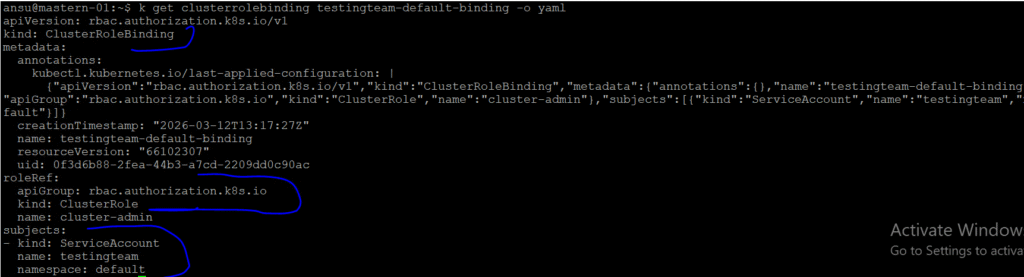
ansu@mastern-01:~$ k get clusterrolebinding testingteam-default-binding -o yaml

apiVersion: rbac.authorization.k8s.io/v1
kind: ClusterRoleBinding
metadata:
  annotations:
    kubectl.kubernetes.io/last-applied-configuration: |
      {"apiVersion":"rbac.authorization.k8s.io/v1","kind":"ClusterRoleBinding","metadata":{"annotations":{},"name":"testingteam-default-binding"},"roleRef":{"apiGroup":"rbac.authorization.k8s.io","kind":"ClusterRole","name":"cluster-admin"},"subjects":[{"kind":"ServiceAccount","name":"testingteam","namespace":"default"}]}
  creationTimestamp: "2026-03-12T13:17:27Z"
  name: testingteam-default-binding
  resourceVersion: "66102307"
  uid: 0f3d6b88-2fea-44b3-a7cd-2209dd0c90ac
roleRef:
  apiGroup: rbac.authorization.k8s.io
  kind: ClusterRole
  name: cluster-admin
subjects:
- kind: ServiceAccount
  name: testingteam
  namespace: default
ansu@mastern-01:~$ k get clusterrolebinding cimtrack-sa-readonly -o yaml

apiVersion: rbac.authorization.k8s.io/v1
kind: ClusterRoleBinding
metadata:
  creationTimestamp: "2026-03-10T13:28:58Z"
  name: cimtrack-sa-readonly
  resourceVersion: "65637225"
  uid: a4c3a5a0-db79-45e0-8516-a0f5a7947125
roleRef:
  apiGroup: rbac.authorization.k8s.io
  kind: ClusterRole
  name: view
subjects:
- kind: ServiceAccount
  name: cimtrack-sa
  namespace: default
Other Helpful Kubernetes Commands
1. How To Check Your Current Context
# kubectl config current-context2. How To List all Available Contexts
# kubectl config get-contextsYou will see something like
CURRENT   NAME             CLUSTER          AUTHINFO
*         dev-cluster      dev              dev-user
          prod-cluster     prod             prod-user
3. How To Switch to Another Context (switching to ‘prod-cluster’ context)
kubectl config use-context prod-clusterClick to Watch Video on How to Create a service account in kubernetes and VMware TKGI

Hi Tekneed,
I hope you are doing well.
My name is Afoke, and I have been following your YouTube content, which I have found very insightful and helpful.
I am currently preparing for the EX374 (Ansible Automation Platform) exam and came across your recommendation to reach out for practice questions, study materials, and guidance. I would really appreciate any resources or direction you can share to support my preparation.
Thank you for the value you provide to the tech community.
I look forward to hearing from you.
Kind regards,
Afoke