Last updated: October 2026
Introduction – OpenShift Container Platform Installation
Installing a Kubernetes cluster requires more than preparing a few servers and starting containers. You must configure the infrastructure, establish networking, prepare the operating system, deploy the control plane, and ensure that worker nodes can run application workloads.
Red Hat OpenShift Container Platform follows a structured installation process that brings these elements together into an enterprise-ready Kubernetes environment.
OpenShift can run on supported bare-metal servers, virtual machines, and cloud infrastructure. The installation procedure depends on the target platform, the level of automation available, and how much control the organisation wants over infrastructure provisioning.
For someone learning OpenShift, there is also an important consideration: building a complete production-style cluster is very different from creating a small environment for development and testing.
In this guide, we will examine the available installation approaches, explain when each is appropriate, and identify the most practical starting point for beginners.
1. What Do You Need Before Installing OpenShift?
Before choosing an installation method, establish what you intend to build.
Are you deploying a production cluster for business applications, setting up an on-premises environment, experimenting with OpenShift on a laptop, or preparing a cloud-based development platform?
Your answer determines the infrastructure, resources, networking, and installation workflow you will need.
1.1 Compute resources
OpenShift requires CPU and memory for its control plane, worker nodes, and supporting platform services.
The necessary resources depend on the topology, OpenShift release, installed features, and application workloads.
A production cluster with several control plane and worker nodes has different resource requirements from a single-node development environment.
1.2 Storage
You need suitable storage for the operating system, cluster components, and any applications that require persistent data.
For production, storage planning must also account for performance, availability, capacity growth, backups, and recovery.
1.3 Networking and DNS
Networking is one of the most important parts of an OpenShift installation.
Depending on the deployment model, you may need to prepare:
- IP addresses and subnet allocation.
- DNS records for the API and application ingress endpoints.
- Load balancing for the API and application traffic.
- Firewall rules and connectivity between nodes.
- Access to the required installation images and software repositories.
- Time synchronisation and other supporting infrastructure services.
Incorrect DNS, unavailable endpoints, or blocked network traffic can prevent an installation from completing successfully.
1.4 Installation access and subscriptions
For Red Hat OpenShift Container Platform, confirm the appropriate subscription or entitlement, access to the installation tools and images, and any required Red Hat account credentials.
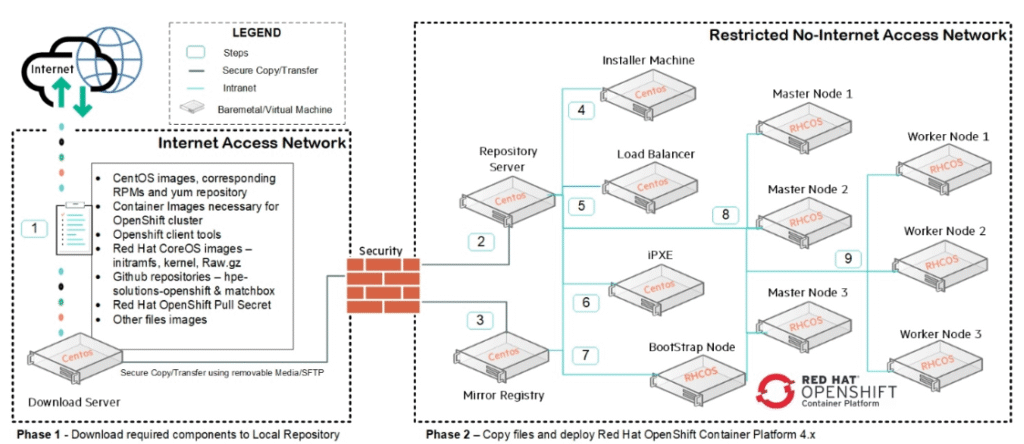
Some installation approaches require downloading installation assets in advance. Disconnected environments require additional preparation because they cannot retrieve everything directly from the internet.
1.5 Supported infrastructure
Not every installation workflow is supported on every platform.
Before provisioning machines, consult the documentation for your target OpenShift release and infrastructure. This is especially important for bare metal, virtualisation platforms, cloud deployments, and specialised architectures.
2. Understanding OpenShift Installation Methods
OpenShift supports different installation approaches to accommodate different infrastructure environments.
Two important traditional installation models are:
- Installer-provisioned infrastructure (IPI)
- User-provisioned infrastructure (UPI)
The distinction concerns how the infrastructure is prepared and how much of that work is handled by the installation process.
2.1 Installer-provisioned infrastructure (IPI)
With installer-provisioned infrastructure, the installation program provisions the infrastructure required by the cluster on supported platforms.
Depending on the platform, this can include creating virtual machines or cloud resources and configuring other infrastructure components needed for the installation.
This approach is useful when you want to automate much of the deployment rather than manually preparing every machine.
For example, on a supported cloud platform, the installer can provision the required resources and then deploy OpenShift onto them.
Advantages of IPI
- Automates substantial parts of infrastructure provisioning.
- Reduces the amount of manual preparation on supported platforms.
- Provides a more integrated installation workflow.
- Can simplify repeatable deployments.
Limitations
- Availability depends on the target platform and installation method.
- Infrastructure permissions and prerequisites must be satisfied.
- Organisations with strict infrastructure standards may need more control over resource provisioning.
IPI does not mean that every operational responsibility disappears after installation. Networking, security, capacity planning, maintenance, and application operations still require appropriate management.
2.2 User-provisioned infrastructure (UPI)
With user-provisioned infrastructure, the administrator prepares the infrastructure before installing OpenShift.
This can involve creating virtual machines, preparing bare-metal servers, configuring networking, arranging load balancing, and establishing the required DNS records.
The OpenShift installation process then deploys the cluster onto that prepared environment according to the supported installation procedure.
UPI is useful when an organisation needs greater control over its infrastructure or when its environment does not support the desired installer-provisioned workflow.
For example, a company running OpenShift on an existing virtualisation platform may have internal teams responsible for creating virtual machines and configuring network services.
The platform team prepares those resources before installing OpenShift.
Advantages of UPI
- Greater control over infrastructure design.
- Flexibility in environments with existing networking and security standards.
- Suitable for supported deployments where infrastructure must be prepared separately.
Limitations
- More preparation is required before installation.
- Incorrect infrastructure settings can cause installation failures.
- The administrator must understand the networking, machine provisioning, and installation requirements.
IPI versus UPI
| Consideration | IPI | UPI |
|---|---|---|
| Infrastructure provisioning | Installer handles much of it | Administrator prepares it |
| Initial preparation | Platform-specific prerequisites | More extensive manual preparation |
| Infrastructure control | Depends on the installer and platform | Greater direct control |
| Suitable environments | Supported automated platforms | Supported environments requiring user-managed infrastructure |
| Operational responsibility | Still required after installation | Still required after installation |
Neither method is universally better. The right choice depends on the supported platform, organisational requirements, and the desired balance between automation and control.
3. Other OpenShift Installation Approaches
IPI and UPI are not the only options worth understanding.
OpenShift also provides installation workflows for particular use cases, including assisted and agent-based installation, single-node deployments, and local development environments.
3.1 Assisted Installer
The Assisted Installer provides a guided installation experience, particularly for supported on-premises deployments.
It helps users prepare and validate the target machines and their configuration before deploying the cluster.
This can be useful when installing OpenShift on bare-metal servers or other supported infrastructure without manually managing every installation step.
However, the Assisted Installer is not simply a replacement for all IPI and UPI workflows. Its capabilities depend on the target environment and supported configuration.
3.2 Agent-based Installer
The Agent-based Installer supports particular on-premises installation scenarios.
It allows installation assets to be prepared in advance so that the installation process can run using the required assets and configuration in the target environment.
This approach can be useful for environments where installation must be performed with limited or no internet connectivity during deployment.
The exact workflow and prerequisites depend on the selected OpenShift release and installation topology.
3.3 Single-node OpenShift (SNO)
Single-node OpenShift runs the control plane and application workloads on a single machine.
Instead of distributing cluster functions across several machines, the installation places them on one node.
This can be useful for development, edge deployments, testing, and certain supported production scenarios.
The main trade-off is availability. A single-node cluster does not provide node-level high availability because there is no second node to take over when the host fails.
Single-node OpenShift can be deployed using supported installation workflows, including the Assisted Installer and Agent-based Installer in applicable scenarios.
Before using it in production, verify the support requirements, workload suitability, recovery procedures, and availability limitations.
4. How Many Machines Do You Need?
A common misunderstanding is that every OpenShift installation requires the same number of servers.
The actual requirement depends on the topology.
A conventional highly available cluster commonly uses three control plane nodes and multiple worker nodes. Some installation procedures also use a temporary bootstrap environment during initial deployment.
However, the bootstrap process and the infrastructure required to support it vary by installation method. A bootstrap machine does not necessarily mean that an additional permanent server must remain in the finished cluster.
Single-node OpenShift is a different topology, with the control plane and workloads running on one node.
The following examples illustrate the difference.
| Environment | Example topology | Primary purpose |
|---|---|---|
| Local development | One local OpenShift environment | Learning and application testing |
| Single-node OpenShift | One cluster node | Edge, testing, or suitable single-node workloads |
| Highly available cluster | Three control plane nodes and multiple workers | Production and resilient workloads |
| Managed OpenShift | Provider-defined infrastructure | Using a managed service |
These are architectural examples, not universal sizing requirements. Always use the requirements for your intended OpenShift version and deployment method.
5. Installing OpenShift on a Laptop or Desktop
If your main objective is to learn OpenShift, you do not need to begin by building a full production cluster.
A local development environment is generally a more practical starting point.
5.1 OpenShift Local
OpenShift Local provides a local OpenShift environment intended primarily for development and testing.
It is designed to make it easier to run OpenShift on a developer’s computer without building a complete multi-machine cluster.
A typical learning workflow is:
- Confirm that your computer meets the requirements for the current OpenShift Local release.
- Obtain the supported OpenShift Local software and required credentials or downloads.
- Install and configure the required host components.
- Start the local OpenShift environment.
- Connect to the cluster using the provided command-line tools or web console.
- Deploy a sample application and explore its resources.
The exact installation steps depend on the host operating system and current OpenShift Local release.
OpenShift Local is not intended to replace a production cluster. It provides a convenient environment for learning application deployment, Projects, Services, Routes, and other OpenShift concepts.
For the current requirements and installation procedure, use the official documentation and downloads rather than relying on old hardware figures from previous tutorials.
5.2 Is OpenShift Local the same as single-node OpenShift?
They share the characteristic of running an OpenShift environment on a single computer, but they are not interchangeable deployment models.
OpenShift Local is a developer-focused local environment. Single-node OpenShift is a supported OpenShift Container Platform cluster topology that can be used in suitable deployment scenarios.
Their installation procedures, operational expectations, and supported use cases differ.
6. Installing a Production-Style OpenShift Cluster On-Premises
An on-premises deployment may use bare-metal servers or virtual machines hosted on a supported virtualisation platform.
The installation process typically involves several stages.
Step 1: Plan the cluster architecture
Determine the required number of control plane and worker nodes, available compute resources, storage requirements, and expected workload capacity.
Identify whether dedicated infrastructure nodes or other specialised configurations are needed.
Step 2: Prepare the network
Arrange the required IP addresses, DNS records, load balancers, and network connectivity.
Confirm that the API endpoint and application ingress endpoints can be resolved and reached as required.
Step 3: Provision the infrastructure
Create the necessary virtual machines or prepare the physical servers.
For IPI, the supported installer workflow may automate much of this process. For UPI, the administrator prepares the infrastructure according to the installation requirements.
Step 4: Prepare the installation assets
Obtain the installation program, the required OpenShift release assets, and the appropriate configuration.
Depending on the installation method, you may need installation configuration files, machine configuration details, ignition-related assets, or agent-based installation media.
Keep credentials and other sensitive information secure throughout this process.
Step 5: Run the installation
Follow the documented installation procedure for the chosen platform and topology.
The installer deploys the control plane and supporting components and brings the cluster toward a functioning state.
Step 6: Verify cluster health
After installation, use the OpenShift CLI to inspect the nodes and cluster Operators.
For example:
oc get nodesThis displays the registered cluster nodes and their readiness status.
To inspect the health of cluster Operators, run:
oc get coTo review the cluster version, use:
oc get clusterversionA successful installation should be followed by verification that the cluster components have reached their expected states. Do not assume that the installation is operationally complete merely because the installer has finished.
Step 7: Complete post-installation configuration
Depending on your environment, further work may include configuring identity providers, storage, monitoring, image registries, network policies, backups, and application deployment workflows.
These activities help turn a newly installed cluster into an environment suitable for its intended workloads.
Important: The commands above are verification examples, not a complete installation procedure. The actual installation commands and configuration files differ by platform and installation method.
7. Can OpenShift Be Installed Directly on Bare Metal?
Yes. OpenShift Container Platform supports bare-metal deployment scenarios.
However, bare-metal installation requires careful planning because the cluster depends on the physical infrastructure and the supporting network services.
Depending on the selected method, preparation may include:
- Preparing servers with supported hardware.
- Allocating network addresses.
- Configuring DNS and load balancing.
- Preparing installation media or boot resources.
- Ensuring the required network connectivity between machines.
- Establishing the appropriate storage and recovery arrangements.
The Assisted Installer and Agent-based Installer are particularly relevant to certain on-premises deployment scenarios.
The appropriate method depends on the OpenShift release, the intended topology, and the capabilities of the infrastructure.
8. OpenShift in the Cloud
Organisations can deploy OpenShift on supported cloud infrastructure or consume it as a managed service.
These options differ in how much responsibility the customer retains for cluster infrastructure and lifecycle operations.
8.1 Self-managed OpenShift on cloud infrastructure
With a self-managed deployment, the organisation operates OpenShift on supported cloud infrastructure.
Depending on the installation method, the installer may provision some resources, or the organisation may prepare the infrastructure itself.
The organisation retains responsibility for the parts of the platform and infrastructure that are not covered by another managed service.
8.2 Azure Red Hat OpenShift (ARO)
Azure Red Hat OpenShift is a managed OpenShift service provided jointly by Microsoft and Red Hat.
It is designed to simplify the deployment and operation of OpenShift on Azure by assigning specified platform responsibilities to the service providers.
The exact division of responsibility depends on the service’s terms and configuration.
8.3 Red Hat OpenShift Service on AWS (ROSA)
ROSA is a managed OpenShift service available on Amazon Web Services.
It allows organisations to use OpenShift on AWS without independently managing every aspect of the underlying OpenShift service.
As with any managed service, customers still need to understand their responsibilities for application workloads, access control, data, and service configuration.
8.4 Which option should you choose?
Choose a self-managed deployment when you need direct control over the supported infrastructure and cluster operations.
Consider a managed service when reducing the operational burden of running the platform is a priority.
The choice should also take into account cost, networking, security, compliance, availability, and the skills available within the organisation.
9. What About OKD and Minishift?
Two names that frequently appear in older OpenShift tutorials are OKD and Minishift.
It is important to understand their roles before following older installation instructions.
9.1 OKD
OKD is the community distribution associated with the upstream project that powers Red Hat OpenShift.
It provides a community-oriented way to explore OpenShift-related technology without treating it as identical to Red Hat’s supported commercial product.
OKD and OpenShift Container Platform have differences in their release processes, packaging, and support arrangements.
If you intend to use OKD, consult its current installation documentation and confirm that the instructions apply to the release you are using.
9.2 Minishift
Minishift was a tool for running an older, single-node OpenShift environment based on OpenShift 3-era technology.
It should not be treated as the recommended approach for learning current OpenShift Container Platform releases.
For modern OpenShift learning, consider OpenShift Local or another currently supported learning environment instead.
Older articles may still mention Minishift, but their installation commands and prerequisites may no longer be applicable.
10. Can You Learn OpenShift Without Installing It?
Yes. Building a cluster locally is not the only way to begin learning OpenShift.
Depending on current availability and eligibility, you may be able to use a hosted developer sandbox or a training environment that provides temporary access to an OpenShift cluster.
A hosted environment can help you practise:
- Creating Projects.
- Deploying applications.
- Working with Pods, Deployments, and Services.
- Exposing applications through Routes.
- Inspecting application logs.
- Managing access and permissions.
This is useful if your computer does not have enough resources for a local environment.
A sandbox generally offers less control over the underlying infrastructure than a self-managed installation. It may also impose usage limits or restrictions on cluster administration.
11. Which OpenShift Installation Method Is Best for Beginners?
If you are new to OpenShift, start with the simplest environment that supports your learning objectives.
Use the following decision guide.
- You want to learn OpenShift commands and deploy applications: Start with OpenShift Local or an available hosted sandbox.
- You want to understand how a real OpenShift cluster is installed: Study the Assisted Installer, Agent-based Installer, and the IPI/UPI distinction.
- You have bare-metal servers and need an on-premises cluster: Evaluate the supported installation methods for your infrastructure.
- You need a production cluster with high availability: Plan a suitable multi-node topology and validate the requirements for your OpenShift release.
- You want OpenShift on AWS or Azure with less platform-management overhead: Evaluate ROSA or ARO.
Do not select an installation method simply because it has fewer steps. The method must be compatible with your infrastructure and the requirements of the environment you intend to build.
Conclusion
Installing Red Hat OpenShift Container Platform begins with understanding the target environment and choosing an appropriate deployment method.
IPI automates much of the infrastructure provisioning on supported platforms, while UPI gives administrators greater responsibility and control over preparing the infrastructure. Assisted and agent-based installation workflows support additional deployment scenarios, including certain on-premises environments.
For developers and learners, OpenShift Local and hosted sandbox environments offer more accessible starting points. For organisations deploying production workloads, infrastructure planning, networking, security, availability, and lifecycle management are essential parts of the installation process.
The best next step is to select a target environment and follow the documentation for the corresponding OpenShift release. Once the cluster is running, practise deploying applications, exposing Services, configuring storage, and investigating cluster health.
These exercises provide a practical foundation for progressing from basic OpenShift installation to real-world platform administration.
Leave a Reply