Last updated: October 2026
In this lesson, you will learn how to create a secure HTTPS Route in OpenShift using imperative commands and declarative YAML. You will also learn how to generate a self-signed TLS certificate, configure the Route, verify HTTPS connectivity, and troubleshoot common certificate errors.
You will also have practical ex280 exam practice questions and answers to prepare you for the ex280 exam.
Understanding The Subject Matter
When deploying web applications on Red Hat OpenShift Container Platform, you may need to make them accessible over HTTPS rather than plain HTTP. HTTPS encrypts communication between clients and the application endpoint, helping protect sensitive information transmitted over the network.
OpenShift supports secure Routes through Transport Layer Security (TLS). You can use a certificate issued by a trusted Certificate Authority (CA), a self-signed certificate for testing, or a certificate managed by an appropriate certificate-management solution.
1. Prerequisites
Before starting, ensure that you have:
- Access to a running OpenShift cluster.
- The
ocCLI installed and authenticated. - Permission to create Deployments, Services, Routes, and Secrets in your project.
- OpenSSL installed on your workstation or another suitable machine for generating a test certificate.
- A hostname that resolves to, or can otherwise reach, your OpenShift cluster’s ingress endpoint.
For this tutorial, we will use the battery project and an application named nginx-app.
The example hostname will be “nginx-secure.apps.ocp.example.com“. This is a placeholder: replace it with a hostname appropriate for your environment, and ensure that the hostname resolves to the cluster’s ingress endpoint.
2. Understand OpenShift Routes and TLS Termination
An OpenShift Route exposes a Service through the cluster’s ingress routing layer. A secure Route uses TLS to protect connections from clients.
There are three main TLS termination types.
2.1 Edge termination
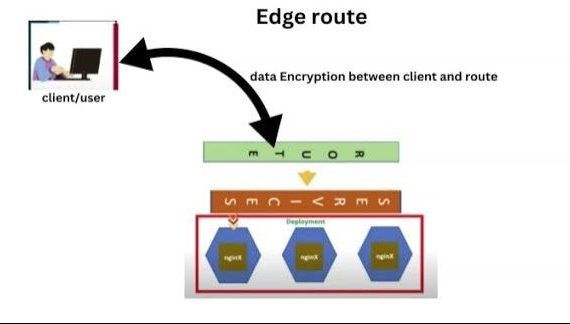
With edge termination, TLS is terminated at the OpenShift router. Traffic between the router and the application backend is typically unencrypted HTTP.
The certificate and private key are configured for the Route, allowing the router to present the certificate to HTTPS clients.
Use edge termination when: You need HTTPS for external clients and your security requirements permit HTTP between the router and the application.
2.2 Re-encrypt termination
With re-encrypt termination, TLS is terminated at the router, and the router establishes a new encrypted TLS connection to the backend application.
The router uses a certificate for the client-facing connection and validates the backend certificate according to the Route and cluster configuration.
Use re-encrypt termination when: Traffic must be encrypted both between external clients and the router and between the router and the application.
2.3 Passthrough termination
With passthrough termination, the router forwards encrypted TLS traffic to the backend without decrypting it. The application is responsible for presenting its certificate and handling TLS.
Use passthrough termination when: The application must handle TLS itself, including cases where the router should not terminate client TLS.
For this tutorial, we will focus on edge termination with a custom certificate, because it is a common way to secure a web application exposed through OpenShift.
ACTION TIME
3. Deploy an Application and Create a Service
Check your connection:
[tekneed@osl ~]$ oc whoami
developer
Switch to the project:
[tekneed@osl ~]$ oc project battery
Now using project "battery".
If the project does not exist, create it first:
[tekneed@osl ~]$ oc new-project batteryIf you do not have permission to create a project, ask your cluster administrator to provide an appropriate project and permissions.
Before creating a Route, we need an application and a Service that the Route can target.
Create a Deployment:
[tekneed@osl ~]$ oc create deployment nginx-app \
  --image=nginxinc/nginx-unprivileged:stable

deployment.apps/nginx-app created
The unprivileged NGINX image listens on port 8080 by default.
Create a Service:
[tekneed@osl ~]$ oc expose deployment nginx-app \
  --name=nginx-app \
  --port=8080 \
  --target-port=8080

service/nginx-app exposed
Verify the resources:
[tekneed@osl ~]$ oc get deployment,serviceWait until the application pod is ready before proceeding. You can check its status with:
[tekneed@osl ~]$ oc get podsThe Route will terminate HTTPS at the router and forward HTTP traffic to the Service, which directs requests to the NGINX pod.
4. Generate a Self-Signed TLS Certificate
A TLS certificate identifies the hostname for which it was issued. For a browser or client to trust the certificate without warnings, it must also trust the issuing CA, and the certificate must be valid for the hostname being accessed.
For this lab, we will generate a self-signed certificate. It is suitable for learning and controlled testing, but it is not automatically trusted by browsers or other clients.
Step 1: Create a directory for the certificate files
[tekneed@osl ~]$ mkdir -p ~/nginx-route-certs
[tekneed@osl ~]$ cd ~/nginx-route-certs
Step 2: Generate the certificate and private key
Run the following command, replacing the example hostname with the hostname you intend to use:
[tekneed@osl nginx-route-certs]$ openssl req -x509 -newkey rsa:2048 \
  -keyout tls.key \
  -out tls.crt \
  -sha256 \
  -days 365 \
  -nodes \
  -subj "/CN=nginx-secure.apps.ocp.example.com" \
  -addext "subjectAltName=DNS:nginx-secure.apps.ocp.example.com"
This command creates two files:
tls.key: the private key.tls.crt: the self-signed certificate.
The subjectAltName extension identifies the hostname for which the certificate is valid. Modern clients generally check this extension rather than relying solely on the certificate’s Common Name.
Important: If you use a different Route hostname, generate a certificate whose Subject Alternative Name includes that hostname. A certificate issued for one hostname will not automatically be valid for another.
Step 3: Inspect the certificate
Check the certificate details:
[tekneed@osl nginx-route-certs]$ openssl x509 \
  -in tls.crt \
  -noout \
  -subject \
  -issuer \
  -dates \
  -ext subjectAltName
Because this is a self-signed certificate, its issuer and subject will normally identify the same entity.
You should see the intended hostname in the Subject Alternative Name output.
5. Create a Secure Edge Route Using Imperative Commands
We now have the application, Service, certificate, and private key. The next step is to create the secure Route.
Run:
[tekneed@osl nginx-route-certs]$ oc create route edge nginx-secure \
  --service=nginx-app \
  --hostname=nginx-secure.apps.ocp.example.com \
  --cert=tls.crt \
  --key=tls.key \
  --port=8080 \
  --insecure-policy=Redirect
route.route.openshift.io/nginx-secure created
Replace the example hostname with the actual hostname covered by your certificate.
The options mean the following:
edgespecifies edge TLS termination.nginx-secureis the Route name.--service=nginx-appidentifies the backend Service.--hostnamespecifies the hostname clients will use.--certsupplies the TLS certificate.--keysupplies the matching private key.--port=8080selects the Service port.--insecure-policy=Redirectredirects HTTP requests to HTTPS for supported edge-terminated Route traffic.
The private key must match the supplied certificate. The Route hostname must also be covered by the certificate.
Verify the Route
Run:
[tekneed@osl ~]$ oc get route nginx-secureInspect its configuration:
[tekneed@osl ~]$ oc describe route nginx-secureYou should confirm that the Route uses the intended Service and port and that its TLS termination is edge.
Retrieve the hostname:
[tekneed@osl ~]$ oc get route nginx-secure \
  -o jsonpath='{.spec.host}{"\n"}'
nginx-secure.apps.ocp.example.com
The output is environment dependent. Your actual hostname will depend on your configuration.
6. Test the Secure Route
Step 1: Test HTTPS with curl
Run:
[tekneed@osl ~]$ curl -v \
  https://nginx-secure.apps.ocp.example.com
Because the certificate is self-signed, curl will normally reject it unless the certificate or its issuing CA is explicitly trusted.
For a temporary lab test, you can use:
[tekneed@osl ~]$ curl -k \
  https://nginx-secure.apps.ocp.example.com
The -k option disables certificate verification. If the Route, DNS, network path, and application are functioning, you should receive the NGINX welcome-page HTML.
Do not use -k as a production security solution. It bypasses certificate validation, making it easier for a client to accept an impersonated server.
Step 2: Verify the certificate
You can inspect the certificate presented by the endpoint:
[tekneed@osl ~]$ openssl s_client \
  -connect nginx-secure.apps.ocp.example.com:443 \
  -servername nginx-secure.apps.ocp.example.com \
  -showcerts
The -servername option supplies the TLS Server Name Indication (SNI), allowing the router to select the appropriate Route certificate.
If the certificate is self-signed, an untrusted-certificate warning is expected unless the certificate is explicitly trusted.
Step 3: Test HTTP redirection
Because the Route was created with --insecure-policy=Redirect, test the HTTP endpoint:
[tekneed@osl ~]$ curl -I \
  http://nginx-secure.apps.ocp.example.com
Where the router supports the configured policy, the response should redirect the client to HTTPS.
7. Create a Secure Route Declaratively Using YAML
Imperative commands are convenient for quick operations. Declarative YAML is useful when you want to store configuration in version control, review changes, and reproduce the same configuration consistently.
In this example, we will create a TLS Secret and then define a Route that references the Secret.
Compatibility note: The spec.tls.externalCertificate reference shown below is supported on OpenShift versions that implement this Route API field. Verify support on your target cluster before using it. For older clusters, use the Route’s inline certificate and key fields or the supported CLI workflow instead.
Step 1: Create a TLS Secret
From the directory containing tls.crt and tls.key, run:
[tekneed@osl nginx-route-certs]$ oc create secret tls nginx-route-tls \
  --cert=tls.crt \
  --key=tls.key \
  -n battery
secret/nginx-route-tls created
Verify the Secret:
[tekneed@osl ~]$ oc get secret nginx-route-tls -n batteryThe Secret stores the certificate and private key in the Kubernetes TLS Secret format. Access to it should be restricted to authorized users and workloads.
Step 2: Create the Route manifest
Create a file named nginx-secure-route.yaml:
[tekneed@osl ~]$ vi nginx-secure-route.yamlAdd the following YAML:
apiVersion: route.openshift.io/v1
kind: Route
metadata:
  name: nginx-secure
  namespace: battery
spec:
  host: nginx-secure.apps.ocp.example.com
  to:
    kind: Service
    name: nginx-app
    weight: 100
  port:
    targetPort: 8080
  tls:
    termination: edge
    insecureEdgeTerminationPolicy: Redirect
    externalCertificate:
      name: nginx-route-tls
  wildcardPolicy: None
Save and close the file.
The externalCertificate field references the Secret that contains the certificate and key. This avoids embedding the private key directly in the Route YAML.
The hostname must match the hostname covered by the certificate. The Service named nginx-app must exist in the same namespace, and the targetPort must refer to a valid Service port.
Step 3: Validate and apply the manifest
Validate the Route against the API server:
[tekneed@osl ~]$ oc apply --dry-run=server -f nginx-secure-route.yamlIf validation succeeds, apply it:
[tekneed@osl ~]$ oc apply -f nginx-secure-route.yaml

route.route.openshift.io/nginx-secure created
The exact output may say configured if the Route already exists.
Step 4: Verify the Route
[tekneed@osl ~]$ oc get route nginx-secure -n battery
[tekneed@osl ~]$ oc describe route nginx-secure -n battery
Check the Route hostname, TLS termination, target Service, and port. Then test HTTPS using the same procedure described earlier.
What if your OpenShift version does not support externalCertificate?
For versions that support the traditional inline Route certificate fields, the TLS section can instead contain the certificate and private key:
tls:
  termination: edge
  insecureEdgeTerminationPolicy: Redirect
  certificate: |
    -----BEGIN CERTIFICATE-----
    REPLACE_WITH_THE_CERTIFICATE_CONTENT
    -----END CERTIFICATE-----
  key: |
    -----BEGIN PRIVATE KEY-----
    REPLACE_WITH_THE_PRIVATE_KEY_CONTENT
    -----END PRIVATE KEY-----
These are placeholders, not valid certificate material. Replace them with the actual PEM-encoded contents and ensure the key matches the certificate.
Because the private key would then be stored in the manifest, do not commit that file to a Git repository or share it as ordinary configuration. Prefer a supported external certificate reference or an appropriate certificate-management workflow when available.
8. Understand the Difference Between the Imperative and Declarative Approaches
| Feature | Imperative | Declarative |
|---|---|---|
| Configuration | Command-line arguments | YAML manifest |
| Certificate input | --cert and --key | Secret reference or inline TLS fields |
| Best suited for | Quick creation and administration | Repeatable, version-controlled configuration |
| Updating configuration | Run suitable commands or patch the resource | Update the manifest and apply it |
| Private-key handling | Supplied from local files | Can be referenced through a Secret, subject to version support |
Both methods can create an edge-terminated secure Route. The appropriate choice depends on your workflow, cluster version, and certificate-management requirements.
9. When Should You Use Re-encrypt or Passthrough Instead?
Edge termination is not suitable for every security requirement.
Re-encrypt example
You can create a re-encrypt Route with the oc CLI:
[tekneed@osl ~]$ oc create route reencrypt nginx-reencrypt \
  --service=nginx-app \
  --port=8080
This requests TLS termination at the router and TLS encryption to the backend. However, the example NGINX configuration in this tutorial listens on HTTP port 8080; it does not automatically provide HTTPS on that port. To use re-encrypt termination successfully, configure the backend application to serve TLS and provide the required certificate trust configuration.
Passthrough example
You can create a passthrough Route with:
[tekneed@osl ~]$ oc create route passthrough nginx-passthrough \
  --service=nginx-app \
  --port=8443
This is only an illustrative command. It will work as intended only if the Service exposes a port that leads to an application endpoint speaking TLS. The NGINX deployment created earlier is not configured to serve TLS on port 8443, so do not expect this example to work without additional application configuration.
With passthrough, the application must present the certificate and terminate TLS itself. The router does not use the Route’s certificate and key to terminate client TLS.
10. Troubleshooting Secure OpenShift Routes
Problem 1: The browser reports that the certificate is not trusted
Cause: The certificate is self-signed or was issued by a CA the client does not trust.
Resolution: For production, use a certificate issued by a trusted CA and configure the client trust chain appropriately. For a controlled lab, explicitly trust the test certificate or CA if appropriate.
Problem 2: The hostname does not match the certificate
Cause: The hostname accessed by the client is not included in the certificate’s Subject Alternative Name.
Resolution: Generate or obtain a certificate valid for the actual Route hostname, and configure the Route to use that hostname.
Problem 3: The Route returns HTTP 503
Possible causes:
- The application pod is not ready.
- The Service selector does not match the application pod labels.
- The Service has no ready endpoints.
- The Service port or target port is incorrect.
Check the resources:
[tekneed@osl ~]$ oc get pods
[tekneed@osl ~]$ oc get service nginx-app
[tekneed@osl ~]$ oc get endpoints nginx-app
[tekneed@osl ~]$ oc describe route nginx-secure
Investigate the application and Service configuration before assuming the certificate is the problem.
Problem 4: The Route cannot be created with an external certificate reference
Cause: Your OpenShift version may not support spec.tls.externalCertificate, or the referenced Secret may be missing or invalid.
Resolution: Check the Route API supported by your cluster and confirm the Secret exists in the Route’s namespace. If necessary, use a supported alternative, such as the inline Route certificate fields or the appropriate CLI command.
Problem 5: HTTPS works with curl -k but fails without it
Cause: The endpoint may be presenting a certificate that the client does not trust, or the certificate chain or hostname validation may be incorrect.
Resolution: Inspect the certificate, verify its hostname and validity dates, and configure the correct CA trust. Do not treat disabling verification as the permanent fix.
11. Clean Up the Lab Resources
When you finish the exercise, remove the resources created for the tutorial:
[tekneed@osl ~]$ oc delete route nginx-secure -n battery
[tekneed@osl ~]$ oc delete secret nginx-route-tls -n battery
[tekneed@osl ~]$ oc delete service nginx-app -n battery
[tekneed@osl ~]$ oc delete deployment nginx-app -n battery
Only run these commands in your test environment and ensure that the resources are not being used by another workload.
You can also remove the local certificate files when you no longer need them. Remember that the private key is sensitive even if the associated certificate is self-signed.
Conclusion
Secure OpenShift Routes allow you to expose applications over HTTPS using TLS certificates. Edge termination is a common starting point because the OpenShift router handles client-facing TLS, while re-encrypt termination protects the connection to the backend and passthrough allows the application to terminate TLS directly.
You have learned how to generate a self-signed certificate, create an edge-terminated Route using imperative commands, configure a Route declaratively, verify HTTPS access, and troubleshoot common issues.
For production environments, use an appropriate certificate-management process, protect private keys, validate certificate trust, and choose the TLS termination strategy that matches your organization’s security requirements.
Recent EX280 Exam Practice Questions on How to Create a Secure HTTPS Route in OpenShift – EX280 Series 2
For Complete Exam Practice Questions & Answer, use this link.
For EX280 Exam Tips, use this link
An application pod named nginx3 already exists in the bottle project. The application is exposed through an existing Service named nginx3.
Configure an edge Route with the following requirements:
Project: bottle
Application pod: nginx3
Existing Service: nginx3
Route name: pass-route
DNS domain: apps-crc.testing
Hostname: nginx3-bottle.apps-crc.testing
HTTPS URL: https://nginx3-bottle.apps-crc.testing
TLS certificate: /home/api/main.crt2
Private key: /home/api/app.key2
CA certificate: /home/api/app.crt2
Container mount path: /usr/local/etc/ssl/certs
Volume access: Read-only
Existing pod manifest: /home/api/nginx3.yaml
Answer
Method 1: Imperative approach
Step 1: Switch to the bottle project
[api@sno ~]$ oc project bottle

Now using project "bottle".
Confirm that the application pod and Service exist:
[api@sno ~]$ oc get pod nginx3
[api@sno ~]$ oc get service nginx3
The Service must exist because the Route directs traffic to a Service, not directly to a pod.
Step 2: Verify the certificate files
Confirm that all three files exist on the machine where you are running the oc commands:
[api@sno ~]$ ls -l /home/api/main.crt2 \
  /home/api/app.key2 \
  /home/api/app.crt2
The certificate must be valid for the hostname nginx3-bottle.apps-crc.testing, and the private key must correspond to that certificate.
Step 3: Create the secure Route
Use the following command to create an edge-terminated HTTPS Route:
[api@sno ~]$ oc create route edge pass-route \
  --service=nginx3 \
  --hostname=nginx3-bottle.apps-crc.testing \
  --cert=/home/api/main.crt2 \
  --key=/home/api/app.key2 \
  --ca-cert=/home/api/app.crt2
Expected output:
route.route.openshift.io/pass-route createdThis creates a Route named pass-route that uses the specified hostname and TLS certificate. With edge termination, the OpenShift Ingress Controller terminates HTTPS and forwards traffic to the backend Service.
Important: This command configures TLS on the Route. It does not mount the certificate files inside the nginx3 container. That is a separate configuration step.
Step 4: Create a Secret for the certificate files
To make the certificates available inside the container, create a Kubernetes Secret from the three files:
[api@sno ~]$ oc create secret generic nginx3-certs \
  --from-file=main.crt2=/home/api/main.crt2 \
  --from-file=app.key2=/home/api/app.key2 \
  --from-file=app.crt2=/home/api/app.crt2 \
  -n bottle
Expected output:
secret/nginx3-certs createdA Secret volume is preferable to mounting files directly from the host node. It makes the certificate files available to the pod without requiring them to exist at the same filesystem paths on whichever worker node runs the application.
Step 5: Update the application pod manifest
Open the existing manifest:
[api@sno ~]$ vi /home/api/nginx3.yamlAdd the following volume definition under the existing pod’s spec section:
volumes:
  - name: nginx3-certs
    secret:
      secretName: nginx3-certs
Under the existing application container’s volumeMounts section, add:
volumeMounts:
  - name: nginx3-certs
    mountPath: /usr/local/etc/ssl/certs
    readOnly: true
These are additions to the existing manifest, not a replacement for its other configuration. If volumes or volumeMounts already exist, add the new entries to the existing lists rather than creating duplicate keys.
The resulting configuration ensures that:
- The certificate files are mounted at
/usr/local/etc/ssl/certs. - The volume is mounted read-only.
- The files are available inside the application container.
The files will appear inside the container with these names:
/usr/local/etc/ssl/certs/main.crt2
/usr/local/etc/ssl/certs/app.key2
/usr/local/etc/ssl/certs/app.crt2
Step 6: Recreate the pod with the updated manifest
Because the pod’s volume configuration generally cannot be modified in place, recreate it using the updated manifest.
Warning: This causes downtime for the application while the pod is recreated. Ensure the manifest accurately describes the existing pod before proceeding.
[api@sno ~]$ oc replace --force -f /home/api/nginx3.yamlWait for the pod to become ready:
[api@sno ~]$ oc get pod nginx3 -n bottleExpected output, when the container becomes ready:
NAME     READY   STATUS    RESTARTS   AGE
nginx3   1/1     Running   0          10s
The pod’s actual readiness depends on the application and its configuration.
Step 7: Verify the certificate mount
Check the volume mount configuration:
[api@sno ~]$ oc describe pod nginx3 -n bottleLook for output similar to:
Mounts:
  /usr/local/etc/ssl/certs from nginx3-certs (ro)

Volumes:
  nginx3-certs:
    Type:        Secret
    SecretName:  nginx3-certs
You can also verify the files inside the container:
[api@sno ~]$ oc exec nginx3 -n bottle -- \
  ls -l /usr/local/etc/ssl/certs
Confirm that all three certificate files are present.
Step 8: Verify the Route
[api@sno ~]$ oc get route pass-route -n bottleExpected output:
NAME         HOST/PORT                         PATH   SERVICES   PORT   TERMINATION
pass-route   nginx3-bottle.apps-crc.testing           nginx3     80     edge
The displayed backend port may differ depending on the existing Service configuration.
Inspect the Route details:
[api@sno ~]$ oc describe route pass-route -n bottleConfirm the following:
- Route name:
pass-route - Hostname:
nginx3-bottle.apps-crc.testing - Service:
nginx3 - TLS termination:
edge
Step 9: Test HTTPS access
Test the application from a machine that can resolve the hostname and reach the OpenShift ingress endpoint:
[api@sno ~]$ curl -I https://nginx3-bottle.apps-crc.testingA successful response might return HTTP/1.1 200 OK, although the exact status depends on the application.
If certificate verification fails, investigate the certificate’s hostname, validity, trust chain, and whether the client trusts the issuing CA. Do not assume that a successful Route creation guarantees a successful HTTPS request.
Method 2: Declarative approach
The declarative approach uses YAML manifests to define the Route and the pod’s certificate volume.
Step 1: Create the Route manifest
Create a file named pass-route.yaml:
[api@sno ~]$ vi /home/api/pass-route.yamlAdd the following configuration, replacing the certificate placeholders with the actual PEM-encoded contents of the specified files:
apiVersion: route.openshift.io/v1
kind: Route
metadata:
  name: pass-route
  namespace: bottle
spec:
  host: nginx3-bottle.apps-crc.testing
  to:
    kind: Service
    name: nginx3
  port:
    targetPort: http
  tls:
    termination: edge
    certificate: |
      -----BEGIN CERTIFICATE-----
      REPLACE_WITH_MAIN_CERTIFICATE_CONTENT
      -----END CERTIFICATE-----
    key: |
      -----BEGIN PRIVATE KEY-----
      REPLACE_WITH_PRIVATE_KEY_CONTENT
      -----END PRIVATE KEY-----
    caCertificate: |
      -----BEGIN CERTIFICATE-----
      REPLACE_WITH_CA_CERTIFICATE_CONTENT
      -----END CERTIFICATE-----
Important: The http target port is an example. Verify the actual named port on the existing nginx3 Service using oc get service nginx3 -n bottle -o yaml. If its port is unnamed or has a different name, use the appropriate target port.
The certificate and private key must contain their real PEM data; the placeholders above have been edited.
Apply the manifest:
[api@sno ~]$ oc apply -f /home/api/pass-route.yamlExpected output for a newly created Route:
route.route.openshift.io/pass-route createdStep 2: Create the certificate Secret
The Secret can also be created imperatively from the existing files, as shown in Method 1. Alternatively, use a declarative Secret manifest if your workflow requires all resources to be managed through YAML.
Step 3: Update the pod manifest
In /home/api/nginx3.yaml, ensure the pod specification contains the following volume:
volumes:
  - name: nginx3-certs
    secret:
      secretName: nginx3-certs
Ensure the application container includes:
volumeMounts:
  - name: nginx3-certs
    mountPath: /usr/local/etc/ssl/certs
    readOnly: true
Save the file, then recreate the pod using the updated manifest as described in Step 6 of Method 1. Applying a modified stand-alone Pod manifest does not automatically make an immutable pod specification updatable.
Step 4: Verify the configuration
Run the following commands:
oc get route pass-route -n bottle
oc describe route pass-route -n bottle
oc get pod nginx3 -n bottle
oc describe pod nginx3 -n bottle
Confirm that the Route has the correct hostname, the TLS termination is edge, the backend Service is nginx3, and the certificate volume is mounted read-only.
EX280 Exam Tips (2026-2027)
- Know the TLS termination types. Edge termination handles HTTPS at the OpenShift Ingress Controller; passthrough forwards encrypted traffic to the application; re-encrypt establishes TLS to the backend as well.
- Know the difference between a Route and a Service. A Route provides external HTTP/HTTPS access, while the Service directs traffic to the application pods.
- Use the correct certificate options.
--cert,--key, and--ca-certconfigure the Route’s certificate, private key, and CA certificate, respectively. - Remember that a Route does not mount certificates into pods. Use a Secret volume or another suitable volume source when the application itself needs access to certificate files.
- Respect the read-only requirement. Use
readOnly: truein the container’svolumeMounts. - Check the existing Service port. The Route’s
targetPortmust match the Service’s actual port name or number. - Verify the hostname and certificate. The certificate must cover
nginx3-bottle.apps-crc.testing, and the DNS name must resolve to the appropriate ingress endpoint.
Final note: prioritize the exact requirements stated in the scenario. If the task only asks for a secure Route, you may not need to modify the application pod. If it explicitly requires the certificate files to be mounted inside the container, complete both configurations and verify them independently.
Leave a Reply