Last updated: January 2026
What should I know about the ex280 exam practice questions & answers
If you are preparing for the Red Hat EX280 exam, this guide is written specifically for you.
The EX280 is not a theory exam. It is a real OpenShift administration exam where you are expected to configure users, projects, permissions, applications, and cluster resources under time pressure.
At TekNeed, we focus on how tasks appear in the exam, not just what the documentation says. This page contains practical EX280 practice questions, complete with explanations and commands you are expected during the exam.
What Makes EX280 Difficult for Most Candidates
Most candidates fail EX280 for three main reasons:
- They rely too much on theory instead of practice
- They are slow with the
occommand line - They don’t fully understand RBAC, projects, and user management
This practice questions are designed to fix those problems.
Click here to get other ex280 premium exam practice questions and answers
If you need some other practice questions that are not listed here, feel free to send an email to info@tekneed.com, and we will let you know if we have them or not.
We currently have the following latest exam practice questions & answers
EX380 Exam Practice Questions & Answers
EX480 Exam Practice Questions & Answers
EX316 Exam Practice Questions & Answers
CKA Exam Practice Questions & Answers
EX374 Exam Practice Questions & Answers
EX467 Exam Practice Questions & Answers
EX288 Exam Practice Questions & Answers
etc
ex280 Exam Practice Question 18
As the cluster administrator with the username, “kubeadmin” and password, ” LumDI-t5jjd-ciyWk-wKsoe”.
Perform the following operations.
NOTE: you can login with (oc login -u kubeadmin -p LumDI-t5jjd-ciyWk-wKsoe https://api.crc.testing:6443)
– create two groups, frontend-group and backend-group
– create six users, tekneed3, tekneed4, tekneed5, tekneed6, tekneed7, and tekneed8 users. They must all have the password, “open”
[NOTE: Update the already existing HTpasswd authentication file in /tmp/htpassword to create the users. Also use/create a secret with the name, “htpassword-secret” from /tmp/htpassword file.]
-The users, tekneed5, and tekneed6 must belong to the frontend-group, and the users, tekneed7, and tekneed8 must belong the backend-group
-create a project, “open-compute” project
-grant the user, tekneed4, project administration privileges on the open-compute project
– give the group, frontend-group read privileges, and the group, backend-group write privileges for the open-compute project
-grant the user, tekneed3 a cluster admin user
Answer
1. Login to the cluster
[victor@sno ~]$ oc login -u kubeadmin -p i4obN-b3jWo-hj82d-rZHLb
Login successful.

You have access to 67 projects, the list has been suppressed. You can list all projects with 'oc projects'

Using project "default".
2. create the two groups.
[victor@sno ~]$ oc adm groups new frontend-group

group.user.openshift.io/frontend-group created


[victor@sno ~]$ oc adm groups new backend-group

group.user.openshift.io/backend-group created
3. Verify that the groups have been created
[victor@sno ~]$ oc get groups

NAME             USERS
backend-group
frontend-group
4. create the users
*you can view the existing file already in /tmp/htpassword
[victor@sno ~]$ cat /tmp/htpassword
tekneed1:$apr1$9av9vl1X$PQqzv/AqEswZQoJqR86e2/
tekneed2:$apr1$dqwzrtyz$fEKau5yHQjyX.7klD9hao/
*create the users
[victor@sno ~]$ htpasswd -b /tmp/htpassword tekneed3 open
Adding password for user tekneed3
[victor@sno ~]$ htpasswd -b /tmp/htpassword tekneed4 open
Adding password for user tekneed4
[victor@sno ~]$ htpasswd -b /tmp/htpassword tekneed5 open
Adding password for user tekneed5
[victor@sno ~]$ htpasswd -b /tmp/htpassword tekneed6 open
Adding password for user tekneed6
[victor@sno ~]$ htpasswd -b /tmp/htpassword tekneed7 open
Adding password for user tekneed7
[victor@sno ~]$ htpasswd -b /tmp/htpassword tekneed8 open
Adding password for user tekneed8
5. Verify that the users have been created.
[victor@sno ~]$ cat /tmp/htpassword

tekneed1:$apr1$9av9vl1X$PQqzv/AqEswZQoJqR86e2/
tekneed2:$apr1$dqwzrtyz$fEKau5yHQjyX.7klD9hao/
tekneed3:$apr1$eMvkoUVJ$tkqWm3.4zkpJTtJQg.mR21
tekneed4:$apr1$y19G58eu$0oYA15lw3X8epAWRSQOPs0
tekneed5:$apr1$TbgBDP0a$.t2td3KP3KCLwx2OTM6Hb1
tekneed6:$apr1$bpkuO8Ka$6lRMiRoyPj0fMSShLNbjT0
tekneed7:$apr1$Yh29LNJ5$73E7P2U1KMjW6NIavlSwH1
tekneed8:$apr1$lUfhJL/n$n4tuArUkp7Smta7pkG6ut1
6. create a secrete for the /tmp/htpassword file
[victor@sno ~]$ oc create secret generic htpassword-secret --from-file  htpasswd=/tmp/htpassword -n openshift-config

secret/htpassword-secret created
7. Update the oauth server (oauth resource yaml manifest configuration file)
*extract the existing oauth resource yaml manifest config file
victor@sno ~]$ oc get oauth cluster -o yaml > oauth.yaml*Edit the file and include the information from the /tmp/htpassword living in the secret, htpassword-secret
[victor@sno ~]$ vi oauth.yaml

.......
 - htpasswd:
      fileData:
        name: htpassword-secret
    mappingMethod: claim
    name: allusers
    type: HTPasswd
..........
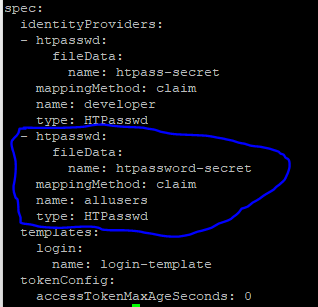
*update the oauth server/resource with the new information
[victor@sno ~]$ oc replace -f oauth.yaml
oauth.config.openshift.io/cluster replaced
8. Try loggingg in as one of the users created.
[victor@sno ~]$ oc login -u tekneed4 -p open

Login successful.

You don't have any projects. You can try to create a new project, by running

    oc new-project <projectname>
NB: You can watch the video on how we carried out some other tests.
9. You can also verify by using the “oc get” command.
NOTE: if you haven’t logged in with the user account for the first time, you may not see the users when you list them with the commands below.
[victor@sno ~]$ oc get users

NAME        UID                                    FULL NAME   IDENTITIES
developer   24b0c61d-2e67-44f5-86cb-56896c5488fc               developer:developer
kubeadmin   2eca97e7-277c-4aa4-a963-7ea45b3b4665               developer:kubeadmin
tekneed4    d148ad64-15e4-4e49-812a-b17b7fcb528a               allusers:tekneed4
[victor@sno ~]$ oc get identity

NAME                  IDP NAME    IDP USER NAME   USER NAME   USER UID
allusers:tekneed4     allusers    tekneed4        tekneed4    d148ad64-15e4-4e49-812a-b17b7fcb528a
developer:developer   developer   developer       developer   24b0c61d-2e67-44f5-86cb-56896c5488fc
developer:kubeadmin   developer   kubeadmin       kubeadmin   2eca97e7-277c-4aa4-a963-7ea45b3b4665
10. Add the users, tekneed5 and tekneed6 to the front-end group
[victor@sno ~]$ oc adm groups add-users frontend-group tekneed5

group.user.openshift.io/frontend-group added: "tekneed5"


[victor@sno ~]$ oc adm groups add-users frontend-group tekneed6

group.user.openshift.io/frontend-group added: "tekneed6"
11. Add the users, tekneed7 and tekneed8 to the back-end group
[victor@sno ~]$ oc adm groups add-users backend-group tekneed7

group.user.openshift.io/backend-group added: "tekneed7"


[victor@sno ~]$ oc adm groups add-users backend-group tekneed8

group.user.openshift.io/backend-group added: "tekneed8"
12. Verify that the users have been added to the group
[victor@sno ~]$ oc get groups

NAME             USERS
backend-group    tekneed7, tekneed8
frontend-group   tekneed5, tekneed6
13. create the project, open-compute
[victor@sno ~]$ oc new-project open-compute

Now using project "open-compute" on server "https://api.crc.testing:6443".

...................
14. grant the user, tekneed4 an admin privilege for the open-compute project
[victor@sno ~]$ oc policy add-role-to-user admin tekneed4

clusterrole.rbac.authorization.k8s.io/admin added: "tekneed4"
NOTE: You can also include the namespace at the end of the command. I did not include it because I am currently using the open-compute namespace.
15. grant the frontend-group read permission in the open-compute project
[victor@sno ~]$ oc policy add-role-to-group view frontend-group

clusterrole.rbac.authorization.k8s.io/view added: "frontend-group"
16. grant the backend-group write permission in the open-compute project
[victor@sno ~]$ oc policy add-role-to-group edit backend-group

clusterrole.rbac.authorization.k8s.io/edit added: "backend-group"
17. grant the user tekneed3, a cluster admin user privilege
[victor@sno ~]$ oc adm policy add-cluster-role-to-user cluster-admin tekneed3

Warning: User 'tekneed3' not found
clusterrole.rbac.authorization.k8s.io/cluster-admin added: "tekneed3"
NB: you are getting the warning because we haven’t logged in to the cluster with user, tekneed3 for the first time
18. Review all the role bindings in the open-compute project.
[victor@sno ~]$ oc get rolebindings -o wide

NAME                    ROLE                               AGE     USERS       GROUPS                                SERVICEACCOUNTS
admin                   ClusterRole/admin                  5m31s   kubeadmin
admin-0                 ClusterRole/admin                  4m11s   tekneed4
edit                    ClusterRole/edit                   105s                back-end
system:deployers        ClusterRole/system:deployer        5m31s                                                     open-compute/deployer
system:image-builders   ClusterRole/system:image-builder   5m31s                                                     open-compute/builder
system:image-pullers    ClusterRole/system:image-puller    5m31s               system:serviceaccounts:open-compute
view                    ClusterRole/view                   2m52s               fron-end
view-0                  ClusterRole/view                   2m46s               front-end
Solution Summary
# oc login -u kubeadmin -p i4obN-b3jWo-hj82d-rZHLb
# oc adm groups new frontend-group
# oc adm groups new backend-group
# oc get groups
# cat /tmp/htpassword
# htpasswd -b /tmp/htpassword tekneed3 open
# htpasswd -b /tmp/htpassword tekneed4 open
# htpasswd -b /tmp/htpassword tekneed5 open
# htpasswd -b /tmp/htpassword tekneed6 open
# htpasswd -b /tmp/htpassword tekneed7 open
# htpasswd -b /tmp/htpassword tekneed8 open
# cat /tmp/htpassword
# oc create secret generic htpassword-secret --from-file  htpasswd=/tmp/htpassword -n openshift-config
# oc get oauth cluster -o yaml > oauth.yaml
# vi oauth.yaml
# oc replace -f oauth.yaml
# oc get pods -n openshift-authentication
# oc get users
# oc get identity
# oc adm groups add-users frontend-group tekneed5
# oc adm groups add-users frontend-group tekneed6
# oc adm groups add-users backend-group tekneed7
# oc adm groups add-users backend-group tekneed8
# oc get groups
# oc new-project open-compute
# oc policy add-role-to-user admin tekneed4
# oc policy add-role-to-group view frontend-group
# oc policy add-role-to-group edit backend-group
# oc adm policy add-cluster-role-to-user cluster-admin tekneed3
# oc get rolebindings -o wide
Ex280 Exam Practice Question 8: Configure and Deploy a Secure Route (2026 Update)
As an OpenShift administrator, you are required to securely deploy an application named oxcart in the project area51.
Perform the following tasks:
a. Ensure the application oxcart is running in the area51 project
b. Configure a secure OpenShift route for the application
c. The application uses a self-signed certificate
d. The certificate subject must be:
/C=US/ST=NC/L=Raleigh/O=RedHat/OU=RHT/CN=oxcart.apps.ocp4.example.com
e. Use the newcert command to generate the TLS certificate and key
f. Pass the certificate subject as an argument to the newcert command
g. The application must be reachable at:
https://oxcart.apps.ocp4.example.com
h. The application must return a valid output when accessed via HTTPS
Answer
1. Switch to the correct project:
[victor@sno ~]$ oc project area51
2. Confirm the application pods are running:
[victor@sno ~]$ oc get pods
3. Check for any existing routes:
[victor@sno ~]$ oc get route
4. If a route already exists for the application, delete it:
[victor@sno ~]$ oc delete route oxcart
5. Verify the route has been removed:
[victor@sno ~]$ oc get route
6. Create a directory to store the certificate files:
[victor@sno ~]$ mkdir cert
[victor@sno ~]$ cd cert
7. Generate the self-signed certificate using the newcert command:
[victor@sno ~]$ newcert "/C=US/ST=NC/L=Raleigh/O=RedHat/OU=RHT/CN=oxcart.apps.ocp4.example.com"
Note: The
newcertcommand is always already installed in the exam environment.
8. Verify the generated certificate and key files:
[victor@sno ~]$ ls
9. Confirm the application service exists:
[victor@sno ~]$ oc get service
10. Create a secure edge route using the generated certificate and key:
[victor@sno ~]$ oc create route edge oxcart \
  --service=oxcart \
  --cert=apps-crc.testing.crt \
  --key=apps-crc.testing.key \
  --hostname=oxcart.apps.ocp4.example.com
11. Verify the secure route:
[victor@sno ~]$ oc get route oxcart
12. Access the application using HTTPS:
https://oxcart.apps.ocp4.example.com
Solution Summary
#Switched to the correct OpenShift project (area51)
#Verified the application pods and services
#Generated a self-signed TLS certificate using the newcert command
#Created a secure edge route using the generated certificate and key
#Verified HTTPS access to the application
Click here to get other ex280 premium exam practice questions and answers
Setup your Lab by clicking here
Watch Video on ex280 exam practice questions & answer 18
How to Use This EX280 Practice Guide
To get the best results from this page:
- Practice Practice Practice
- Use the
ocCLI instead of the web console if you can - Time yourself while performing tasks
- Verify every task before moving on
If you can complete these tasks comfortably, you are exam-ready.
Key EX280 Topics
This ex280 exam practice covers the most important EX280 objectives:
- User and group management
- Role-Based Access Control (RBAC)
- Project administration
- Application deployment and scaling
- Troubleshooting pods and services
- Persistent storage basics
- OpenShift networking concepts
Who This Page Is For
- Candidates searching for EX280 dumps
- Engineers preparing for the EX280 OpenShift exam
- DevOps and Kubernetes professionals
- Anyone aiming to pass EX280 on the first attempt
EX280 Dumps – Frequently Asked Questions
Q: Are EX280 practice questions reliable?
Yes. The EX280 exam is hands-on and task-based. Getting practice questions speeds the learning faster and helps you practice more.
Q: Can I pass EX280 using dumps only?
It is a good idea to go through the exam objectives. study it and understand it. That way, you just don’t pass the exam with the dumps but you also understand the OpenShift platform.
Q: What is the best alternative to EX280 dumps out there?
Hands-on practice questions and real OpenShift administrative tasks like the ones provided by TekNeed is the best.
Your feedback is welcomed. If you love others, you will share with others
Is there any possibility to Get DO188 examp dump
Please send an email to info@tekneed.com
Thank you.
I passed my ex280 exam. Thank you for your support as always!
me podrias decir que tan dificil es? si vienen mas preguntas aparte de estas que menciona el blog? o con estas es suficiente?
Hi Cloe,
Can you share the set of questions that are present in the exam please?
Hi Cloe, Could you please share the set of questions in exam
It was a tough exam but I was able to pass by your practice questions. You helped me a lot. Thank you team
Hi Paige,
Can you please share the set of questions that was present in the examination?
Can you please share ex280 practice questions?
Thank you Tekneed team. I passed the exam.
what version of the exam is this?
I have passed my exam yesterday. Tekneed is wonderful. Thank you guys.
Congratulations!!
Are these questions valid for ex280 4.12 or ex280 4.10 ?
We have both practice questions. 4.10 and 4.12
Hi David. how can I get the questions form ex280 4.12
would you please let us know the payment method if one want to buy the EX280 premium package
can you please send an email to info@tekneed.com.
Thank you.
I have passed my exam again with your premium contents. Thank you, victor & Tekneed
Great Job team, I practiced the questions multiple times & I passed. I also sent an update on question 11 to your email.
conngratulations Ryan SSD!
From your study materials to your practice questions, you are the best out there. Thank you for making me pass. My effort and sleepless nights did not waste because of you.
Hello Eugene P , I am revising to pass the ex280 exam, following your recent successful exam, the questions and answers addressed are they sufficient to succeed? thank you very much for your feedback.
I am happy I found your channel. Thank you for helping me pass the exam with your dumps.
Can you please send me?
great materials, I passed. Thanks Team
Thank you Team. I passed my exam yesterday. I love you all
what version is this ex280 questions pls answer me
We have version 4.14. Kindly send an email to info@tekneed.com
Thank you.
i need 4.14 question
I passed my exam yesterday. 250 out of 300. Thank you Team Tekneed
Congratulations Ella!
Please i need the latest one
Please i need the latest one
Its available. Please send an email to info@tekneed.com
Hi, I need the latest.
How many question Do you have for Ex280 ?
Thank you.
Hi. Yes, we have the latest. Please send an email to info@tekneed.com with all your questions.
Thank you
I passed the ex280 version 4.14 exam. I am happy I found your channel. Thank you!
Hi Team, Please need the premium dump and last one for EX280.
Thanks
Hi Akram, please send an email to info@tekneed.com
I was scared of the exam and today I finally passed v 4.14 with 254/300. Thank you for your help. I am definitely getting 380 from you.
I am currently preparing for the EX280 exam, and I truly need a dump that accurately reflects what will be on the actual test. Thank you very much.
kindly send an email to info@tekneed.com
Thank you
I rushed here to also type this: I PASSED. Your practice questions are correct. Thank you Tekneed.
I want to study about the linux.
Thank you Team Tekneed.
I have cleared my exam. Your practice questions are the best.
Hello, I am looking for EX288.
please send an email to info@tekneed.com
can I get ex380 as well? BTW, I passed ex280. Thank you.
congratulations. Please send an email to info@tekneed.com
How i get access EX188 questions
please send an email to orders@tekneed.com or info@tekneed.com
Hello Team,
I passed the ex280 exam with your practice questions. exact questions and answers. Thank you.
Hello, I am looking for ex280 questions
please send and email to info@tekneed.com